Agents written from your own work and your own data.
An agent is a job you describe once and SourceLace then does for you, again and again. The hard part is describing it well. Agent Architect, an optional add-on, does that part with you: it asks about your work, studies the systems you choose, and proposes agents that fit your week.
Optional add-on. Ask us about it in your pilot.
Good agents need good instructions, and few people have both halves.
The people who know the business rarely know the systems. The people who know the systems rarely know the business. So most companies need engineers to build their agents, and the agents that get built answer the engineers' questions, not yours.
From a short conversation to an agent you can try.
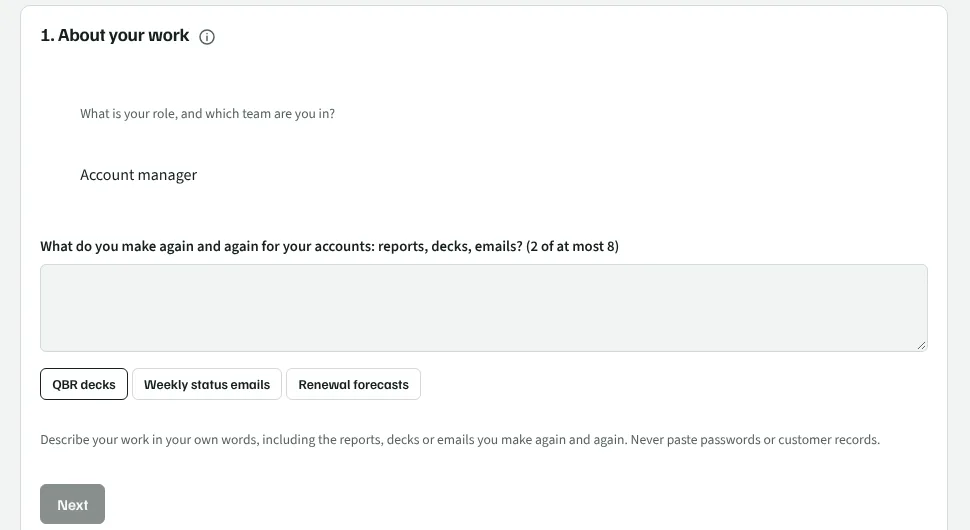
Talk about your work
A short conversation: your role, what you prepare for, and the reports, decks and emails you make again and again. You can link examples of your work, such as last quarter's review deck. Your answers are saved as you go, so you can stop and come back.
It studies your systems
You choose which of your connected systems it may look at. It studies them with your own access, so it sees what you may see and nothing more.
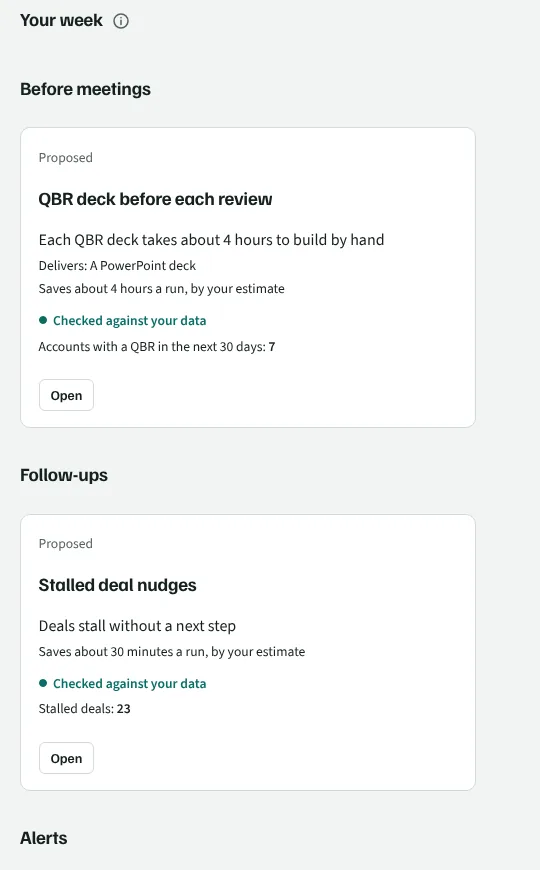
You get proposals for your week
Proposals are grouped by the part of your week they help with: before meetings, reports, follow-ups, alerts, decisions, data quality, requests and processes.
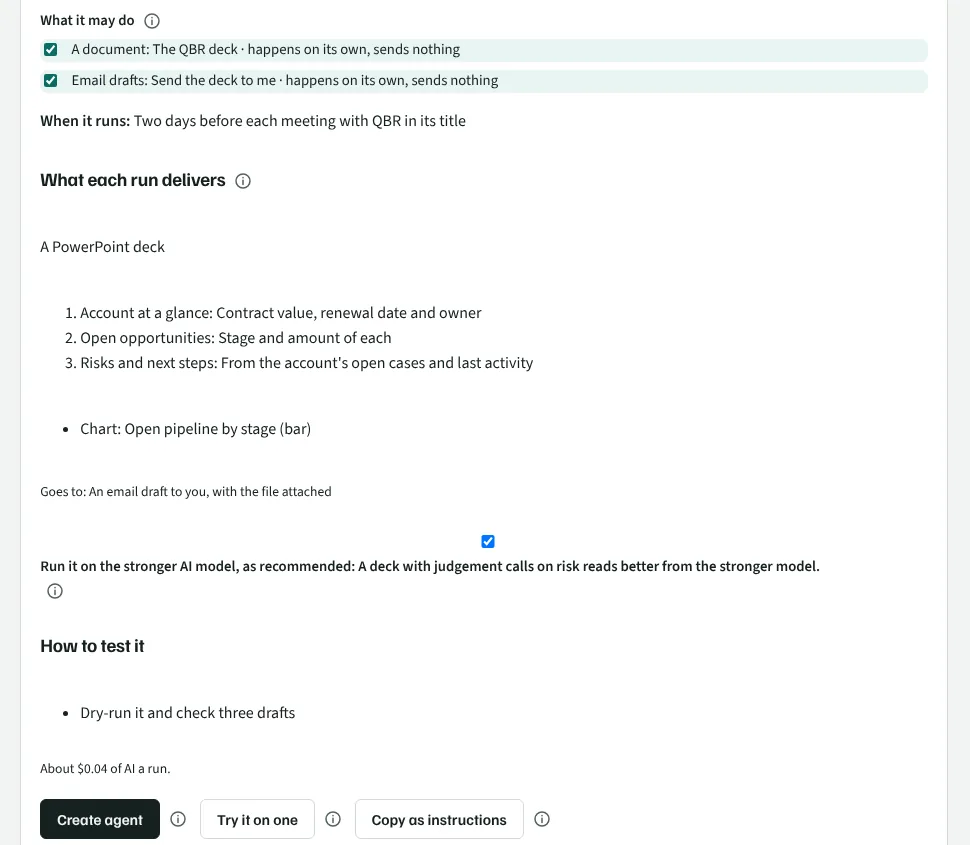
Each proposal says what you get
It says what every run delivers, for example a PowerPoint with its sections and charts. It says what is left for you to set up, how sure it is, and how much time it saves, by your own estimate and not a figure it made up.
Change it in plain words
Ask for a change in your own words, such as "shorter, and leave out closed deals". Then try it once on your data to see the result.
Try it, copy it or create it
Try it once on your data. Copy it as instructions. Or create the agent. It is then an ordinary agent, with the same approvals as any other.
The conversation, your week and a proposal.
These pictures are from the SourceLace app, with made-up demo data for a pretend company called Corvanta.
Your own files shape what an agent writes.
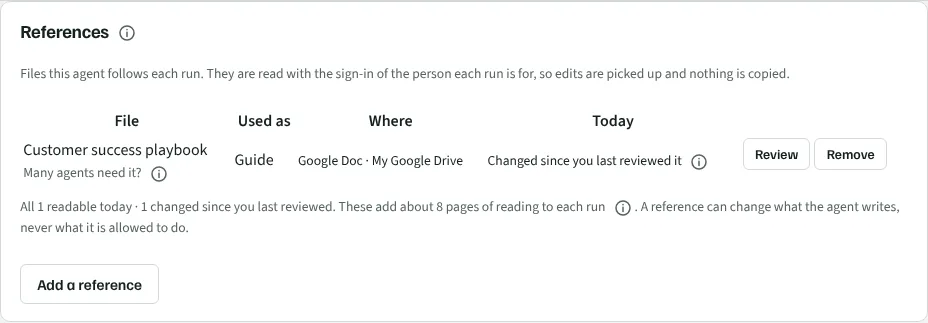
An agent can keep up to ten files linked to it. It reads each one again on every run, with the access of the person the run is for, so your edits are picked up. Nothing is copied.
A linked file can change what an agent writes. It can never change what the agent may do. A sentence in a file such as "ignore your rules" is treated as text, not as an order.
Make the same kind of thing
Link last month's board report or a weekly status email, and the agent matches its style and structure.
Follow your rules
Link your sales playbook or pricing policy, and the agent follows it when it writes.
Fill your own PowerPoint, Word or Excel file
The agent fills the file on every run and keeps its layout and styles. A place it has nothing for is left alone and named, never filled with a guess.
See when a file changed
When someone edits a linked file, the agent says so. The next run sends its automatic actions to approval once, so a changed file cannot quietly change what goes out.
You stay in charge of what it reads, sends and does.
It reads with each person's own access
It sees only what the person using it may see in each system.
Sensitive values are masked first
Your data protection rules apply, and your admin can add stricter ones for Agent Architect alone. Email addresses, phone numbers and card and account numbers are always masked. A masked value is replaced by a placeholder before anything reaches your AI provider. Text no rule covers, such as a name in a free-text field, is sent as it is, so your admin decides how much it may see.
Saved proposals hold no values from your records
A proposal can name the objects and fields it uses. It never contains values from your records.
Nothing becomes an agent until you create it
Changes to records wait for approval, as they do for every agent.
Your admin chooses who may use it
An admin decides which people or groups may use Agent Architect, and which of your systems it may study.
Design once for your team
A team lead can design one shared agent. Each person who subscribes gets their own result, read with their own access, so nobody sees more than before.
Totals, never one person's figures
Your admin sees whether agents are kept and the time saved by people's own estimates, for the organization and for groups where at least five people use it. While fewer than five people use it, those figures are not shown. Each person sees only their own figures.
What is kept, for how long and what removes it is in the privacy policy.